Roles of Computers in Learning
The potential uses of computers in educational settings go far beyond direct instruction. One function is administrative-keeping school records, scheduling classes, doing payroll, and managing student assessment data. Another is service oriented, as when guidance programs use computers to deliver career planning assistance. In the domain of instruction there are four broad classes of computer applications:
- As an object of instruction
The computer may itself be the object of instruction. In this role, the computer is treated like any other machine one is learning to use.
- As a tool
In its role as a tool, the computer assists both teachers and students.
- As an instructional device
Computer-assisted instruction (CAI) helps students learn specific skills.
- As a means of teaching logical thinking
Using LOGO, a procedural language that was designed for learners, students can learn about the complexity of mathematics within their daily lives.
Integrating Computers into the Curriculum
The ultimate value of technology in education and training depends on how fully they are integrated into the curriculum. Instructions need a framework for using computer technology that covers a variety of learning styles and accommodates varied teaching methods. Most important, results need to be measureable againts a clear set of goals and objectives-the second step in the ASSURE model. In classrooms where computer technology is integrated successfully, students use it with the same ease with which they use books, maps, pencils, and pens. In technology-rich classrooms students and teachers engage in problem solving, cultivate creativity, collaborate globally, and discover the value of lifelong learning.
Integrated Learning System
In many schools a viable form of computer use is the integrated learning system (ILS), referring to a networked set of computer workstations equipped with software that provides a particular set of sequential lessons. Students work through these lessons as prescribed by the built in management system, which tracks individual student progress.
- Advantages :
1. Self-pacing
2. Total package
3. Validated
- Limitations :
1. Courseware quality
2. Evidence of effectiveness
3. Loss of flexibility
4. Reports
5. Curricular integration
- Integration :
The integrated learning system (ILS) lessons are one component of an overall school program that combines team teaching, thematic units, student and parent involvement in goal setting, and customization to the prescriptions of the local teaching staff.
Software Selection
There are several factors associated with selecting software. Foremost is to examine the software within the content of the learning outcomes. Other factors that should be considered include content, format, ease of operation, design, and completeness of the package.
- Accuracy
When looking at software, you need to consider the content in terms of its accuracy. Its important to consider the sequencing of the information.
- Feedback
Its important that software follow sound educational techniques and principles. In a drill and practice program its important that students have frequent informative feedback.
- Learner Control
Another important criterion is the amount of learner control given the student. Software should provide students with opportunities to select topics within areas of study. Also, students need to be able to control how quickly they progress through material.
- Prerequisites
Prerequisite skills need to be identified if they are essential for successful use of the software. Information needs to be presented at a level appropriate for students.
- Ease of Use
Ease of use is a particularly critical attribute in situations where students are working individually or in small groups on different projects, using different software. If you must continually be interrupted to help students cope with obstacles in using difficult software, then both you and your students become frustrated.
- Special Features
Sometimes software has special effects or features that may be essential for effective learning. Color, graphics, animation, and sound should be a part of quality software only if they contribute to student learning.
Computer Hardware
The physical equipment that makes up the computer is referred to as the hardware. A computer's specific combination of hardware components is referred to as its configuration.

Input devices transmit information into the computer. The most commonly used input device is the keyboard. Others include mouse, trackballs, joysticks, graphics tablets, and even voice.

The central processing unit (CPU) is the core element, or "brain" that carries out all the calculations and controls the total system. In a personal computer the CPU is one (or more) of the tiny chips (microprocessors) inside the machine.
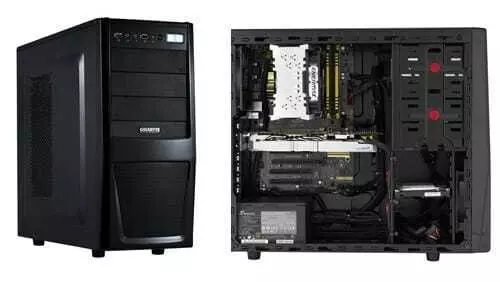
The memory contains the control function-that is, the programs written to tell the CPU what to do in what order. In computers, control instructions and sets of data are stored in two types of memory.
- Read-only memory (ROM)➱ This consists of the control instructions that have been "wired"permanently, into the memory and which the computer will need constantly, such as programming languages and internal monitoring functions.
- Random access memory (RAM)➱ The particular program or set of data being manipulated by the user is temporarily stored in RAM, then erased to make way for the next program.

The most common storage mechanism is the magnetic disk. Recordable CD-ROMs are becoming common. Storage capacity (measured in Mb or Gb) has expanded to keep pace with the rapidly growing memory demands of today's software and the ever-increasing size of graphics and animation laden multimedia data files.
+.jpg)
Output devices display the results of your program. A television-type monitor, referred to as a CRT (cathode ray tube), is the usual output device of a personal computer. Liquid-crystal (LCD) and other display types are becoming common. It may be built into the total package, or it may be a separate component.

Computer Facilities
There are a variety of facilities for computer use. They range from the computer classroom (one or more computers in a single classroom) to the computer laboratory.
The one-computer classroom, then, can be viewed as a place where you may use the computer in many ways :
Computer Hardware
- Basic Components
The physical equipment that makes up the computer is referred to as the hardware. A computer's specific combination of hardware components is referred to as its configuration.

- Input Device
Input devices transmit information into the computer. The most commonly used input device is the keyboard. Others include mouse, trackballs, joysticks, graphics tablets, and even voice.
- Central Processing Unit
The central processing unit (CPU) is the core element, or "brain" that carries out all the calculations and controls the total system. In a personal computer the CPU is one (or more) of the tiny chips (microprocessors) inside the machine.
- Memory
The memory contains the control function-that is, the programs written to tell the CPU what to do in what order. In computers, control instructions and sets of data are stored in two types of memory.
- Read-only memory (ROM)➱ This consists of the control instructions that have been "wired"permanently, into the memory and which the computer will need constantly, such as programming languages and internal monitoring functions.
- Random access memory (RAM)➱ The particular program or set of data being manipulated by the user is temporarily stored in RAM, then erased to make way for the next program.

- Storage
The most common storage mechanism is the magnetic disk. Recordable CD-ROMs are becoming common. Storage capacity (measured in Mb or Gb) has expanded to keep pace with the rapidly growing memory demands of today's software and the ever-increasing size of graphics and animation laden multimedia data files.
- Output Device
Output devices display the results of your program. A television-type monitor, referred to as a CRT (cathode ray tube), is the usual output device of a personal computer. Liquid-crystal (LCD) and other display types are becoming common. It may be built into the total package, or it may be a separate component.

Computer Facilities
There are a variety of facilities for computer use. They range from the computer classroom (one or more computers in a single classroom) to the computer laboratory.
- The One-Computer Classroom
The one-computer classroom, then, can be viewed as a place where you may use the computer in many ways :
- Large group ➨ With a data projector you can demonstrate to a whole class how to use a particular software program or how to manage a particular set of data.
- Small group ➨ A small group of students can work together with the computer. Students can interact with a program in groups, then return to their seats, allowing others to have some time on the computer. Each group has a turn using the software to gather or present data.
- Learning center ➨ Individual students or small groups can go to a learning center that has at its core a computer. Integrating a specific software program into the center, you create another type of interactive learning center.
- Personal secretary ➨ Every teacher is responsible for maintaining grades, communicating with parents, and preparing instructional materials. The computer can assist you with these types of tasks.
- The Multiple-Computer Classroom
A computer classroom is useful when the teacher wants to present to all students simultaneously. The teacher should have a projection device to display information for all students on one screen. In some networks the teacher can control and monitor what is shown on each student computer.
- The Computer Laboratory
Schools often place 15 to 20 computers together in a single room called a computer laboratory. The computer laboratory is appropriate if you want students to be working independently or in small groups on different programs and different activities.
There are advantages to using a computer lab. A group of students can be taught the same lesson simultaneously, which might be more efficient for the teacher. Also, software can be located in one place conveniently. Supervision and security are often easier when all the computers are located in a single room.
The foremost limitation with the computer lab as access. If there are no other computers available to students outside the computer lab, then students may have a problem. If a class is scheduled to use the lab, students will have to wait until the lab is not scheduled to use the facilities. Also, because of the schedulling problem, some classes may not have access to the lab at all.
Source : Heinich, Molenda, Russell, Smaldino et. All. 2002. Instructional Media and Technologies for Learning Volume 7. California : The University of California.


Tidak ada komentar:
Posting Komentar