Internet
The internet is a frequently changing collection of millions of computer networks serving tents of millions of people around the world. Any individual on the internet can communicate with anyone else on the internet.
It provides users with several basic types of connection services:
1. Electronic mail (e-mail) for person-to-person communication.
2. A type of electronic, public bulletin board enabling a person to connect with a group interested in the same topic.
3. Information search capabilities for accessing libraries and databases of information throughout the world.
4. Access to highly specialized computer programs not readily available to individuals
5. "Live" communication.
6. Audio communication.
7. Video-based communication.
An internet address contains three parts: the person's name or username (pseudonym), the computer network where they can be reached, and the type of organization they are a part of.
Internet users can communicate with one another by participating in discussion groups, of which there are two types: newsgroups (sometimes called' chat groups or conferences) and mailing list (also called listservs). Both newsgroups and mailing lists are typically dedicated to a single subjects, and allow you to read comments, questions, and answers of others on the same subjects and to post comments, questions,and answers of your own.
The internet has acquired its own vocabulary of hundreds of terms.
World Wide Web: Access To The Internet
The World Wide Web (the Web) is not separate from the internet.The web protocol, called hypertext transfer protocol (HTTP), ensures compatibility before transferring information. The web is comprised of documents called web pages. Each access a website by entering its called a website. User access a website by entering its address or uniform resource locator (URL).
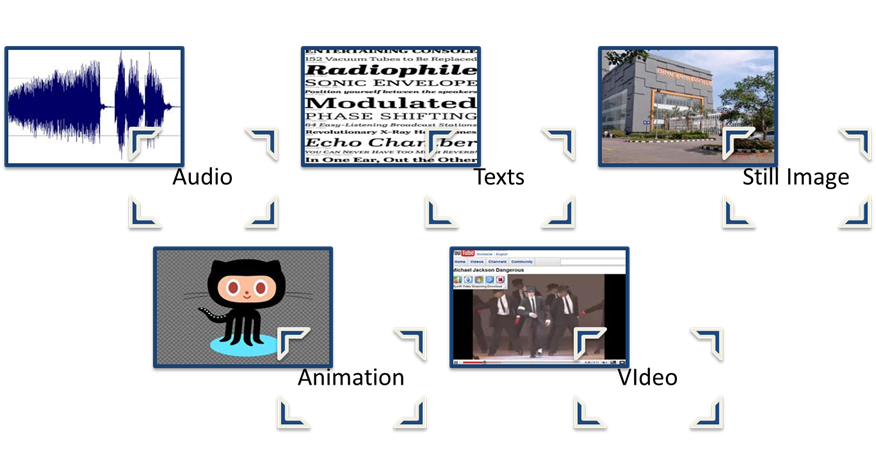
1. Variety of media.
2. Up-to-date information access.
3. Navigation.
4. Idea exchange.
5. Convenient.
6. Low cost.
1. Age-inappropriate material.
2. Copyright.
3. Unprecedented.
4. Support.
5. Access.
6. Access sped.
7. Lack of quality control.
Computer networks, especially the internet, can serve a number of functions. Students and teachers can access services and information such as documents, government information, databases, online bibliographies, articles, publications, and computer software.
Intranet
Intranets are internal networks for companies or schools. Intranets are a way of increasing communication, collaboration, and information dissemination within companies or schools where divisions, departments, and work groups each use a different computer platform (hardware and / or operating system), or where users work in geographically distant locations. User access the intranet either directly or by dialing into the network.
1. Centralization.
2. Consistency.
3. Currency.
4. Pull versus push approach.
1. Unreliable remote connections.
2. Speed of responses.
Intranets are very useful for training when the audience is large and geographically dispersed and when the instruction is update frequently (see"Close-up:Deere & Company Delivers Training Over Its Internet").
Wide Area Network (WAN)
Computer networks that extend beyond the walls of a room or building are called wide area networks (WANs). A WAN connects a number of computers within a single institution and beyond with one another.
Wide area networking via a computer and modern is done from locations throughout the world. People accessing networks use an array of tools, including e-mail, bulletin boards systems, and information resources, such as databases and libraries.
Local Area Network (LAN)
A local area network (LAN) connects computers within a limited area, normally a building, office, or laboratory.
A LAN relies on a centralized computer called a file server that "serves". A computer lab is often a LAN because all the computers in the lab are connected to a single file server, which is usually tucked away in a closer or other out of-the-way space.
The advantages of local area networks include ease of communication. A LAN allows people to communicate with each other by leaving messages o the network system. Also, more people have access to software and information.
1. It is expensive to establish a building wide network.
2. A computer lab may limit access.
3. Another limitation is the requirement that schools or offices purchase special network-compatible software.
One primary educational application of a LAN is in a computer lab, with 15 to 20 computers connected together. When a teacher wants each students to be working on a computer during a lesson, the lab makes it possible for the whole class to have access to computers simultaneously.
Source : Heinich, R., Molenda, M., Russell, J, D.,& Smaldino, S, E,..2002. Instructional Media and Technologies For Learning volume 7. California : The University of California.
The internet is a frequently changing collection of millions of computer networks serving tents of millions of people around the world. Any individual on the internet can communicate with anyone else on the internet.
- Internet services
It provides users with several basic types of connection services:
1. Electronic mail (e-mail) for person-to-person communication.
2. A type of electronic, public bulletin board enabling a person to connect with a group interested in the same topic.
3. Information search capabilities for accessing libraries and databases of information throughout the world.
4. Access to highly specialized computer programs not readily available to individuals
5. "Live" communication.
6. Audio communication.
7. Video-based communication.
- Internet addresses
An internet address contains three parts: the person's name or username (pseudonym), the computer network where they can be reached, and the type of organization they are a part of.
- Internet usage
Internet users can communicate with one another by participating in discussion groups, of which there are two types: newsgroups (sometimes called' chat groups or conferences) and mailing list (also called listservs). Both newsgroups and mailing lists are typically dedicated to a single subjects, and allow you to read comments, questions, and answers of others on the same subjects and to post comments, questions,and answers of your own.
- Internet language
The internet has acquired its own vocabulary of hundreds of terms.
World Wide Web: Access To The Internet
The World Wide Web (the Web) is not separate from the internet.The web protocol, called hypertext transfer protocol (HTTP), ensures compatibility before transferring information. The web is comprised of documents called web pages. Each access a website by entering its called a website. User access a website by entering its address or uniform resource locator (URL).
- Advantages
1. Variety of media.
2. Up-to-date information access.
3. Navigation.
4. Idea exchange.
5. Convenient.
6. Low cost.
- Limitations
1. Age-inappropriate material.
2. Copyright.
3. Unprecedented.
4. Support.
5. Access.
6. Access sped.
7. Lack of quality control.
- Integration
Computer networks, especially the internet, can serve a number of functions. Students and teachers can access services and information such as documents, government information, databases, online bibliographies, articles, publications, and computer software.
Intranet
Intranets are internal networks for companies or schools. Intranets are a way of increasing communication, collaboration, and information dissemination within companies or schools where divisions, departments, and work groups each use a different computer platform (hardware and / or operating system), or where users work in geographically distant locations. User access the intranet either directly or by dialing into the network.
- Advantages
1. Centralization.
2. Consistency.
3. Currency.
4. Pull versus push approach.
- Limitations
1. Unreliable remote connections.
2. Speed of responses.
- Integration
Intranets are very useful for training when the audience is large and geographically dispersed and when the instruction is update frequently (see"Close-up:Deere & Company Delivers Training Over Its Internet").
Wide Area Network (WAN)
Computer networks that extend beyond the walls of a room or building are called wide area networks (WANs). A WAN connects a number of computers within a single institution and beyond with one another.
Wide area networking via a computer and modern is done from locations throughout the world. People accessing networks use an array of tools, including e-mail, bulletin boards systems, and information resources, such as databases and libraries.
Local Area Network (LAN)
A local area network (LAN) connects computers within a limited area, normally a building, office, or laboratory.
A LAN relies on a centralized computer called a file server that "serves". A computer lab is often a LAN because all the computers in the lab are connected to a single file server, which is usually tucked away in a closer or other out of-the-way space.
- Advantages
The advantages of local area networks include ease of communication. A LAN allows people to communicate with each other by leaving messages o the network system. Also, more people have access to software and information.
- Limitations
1. It is expensive to establish a building wide network.
2. A computer lab may limit access.
3. Another limitation is the requirement that schools or offices purchase special network-compatible software.
- Integration
One primary educational application of a LAN is in a computer lab, with 15 to 20 computers connected together. When a teacher wants each students to be working on a computer during a lesson, the lab makes it possible for the whole class to have access to computers simultaneously.
Source : Heinich, R., Molenda, M., Russell, J, D.,& Smaldino, S, E,..2002. Instructional Media and Technologies For Learning volume 7. California : The University of California.





+.jpg)


